How a TMS Works With Fleet Tracking and GPS Locks: One Trip, From Order to Payment
By Moeen Khan
Picture this. It is 4:40 pm and your distributor in Hyderabad is on the phone. Fourteen cartons are missing from a truck that left your Pune plant two days ago.
You check the GPS report. The truck stayed on its route. The driver says the seal was fine when he reached it. Meanwhile, the transporter's bill has already arrived, with two extra days of waiting charges on it.
So who is right? You have three stories about one trip, and no way to prove any of them.
This happens in most transport teams. The problem isn't missing data. It's that the data sits in different places. The GPS knows where the truck went. The papers say what was loaded. The bill says what you owe. Nothing connects them.
In this blog, we follow one trip through Lynkit's transport management system (TMS), from the moment the order comes in to the moment the transporter gets paid. Along the way, you'll see exactly where GPS tracking, GPS locks and the freight bill come together.
Quick answer: A transport management system (TMS) plans, runs and pays for every shipment. Fleet tracking tells it where each truck is. GPS locks tell it whether anyone opened the cargo. Together, they give you live alerts, proof of delivery and a correct freight bill, without anyone typing the same details twice.
How Does a TMS Work, From Order to Payment?
In Lynkit TMS, every trip has one live record. Each team adds to it and reads from it, so nobody keeps their own copy. Here's how the Pune to Hyderabad trip moves through eight steps.
Step 1: The order comes in
The distributor's order flows in from SAP and turns into a truck request (an indent) on its own. It goes to your transporters based on their contract share. You can see who accepted, who said no and who didn't reply, and pass it to someone else in one click.
Step 2: The trip gets planned
Lynkit's own route and load engine, which holds a patent for route optimisation, suggests the right truck. It works out how to pack the load by weight, stacking and drop order. It also checks whether your own truck or a hired one costs less.
Step 3: A transporter is chosen
If there's no contract for this route, you can ask for quotes or run a reverse auction. Bids are ranked on price and past performance, not just the cheapest rate. The winning rate becomes a contract automatically.
Step 4: The truck enters and loads
The truck arrives in its time slot. The system checks the vehicle on VAHAN and the driver's licence on Sarathi. An RFID gate lets in only the right truck, and the weighbridge reading goes straight into the trip. The lorry receipt (e-LR) and e-Way Bill are created from the same record.
Step 5: The truck is tracked and secured
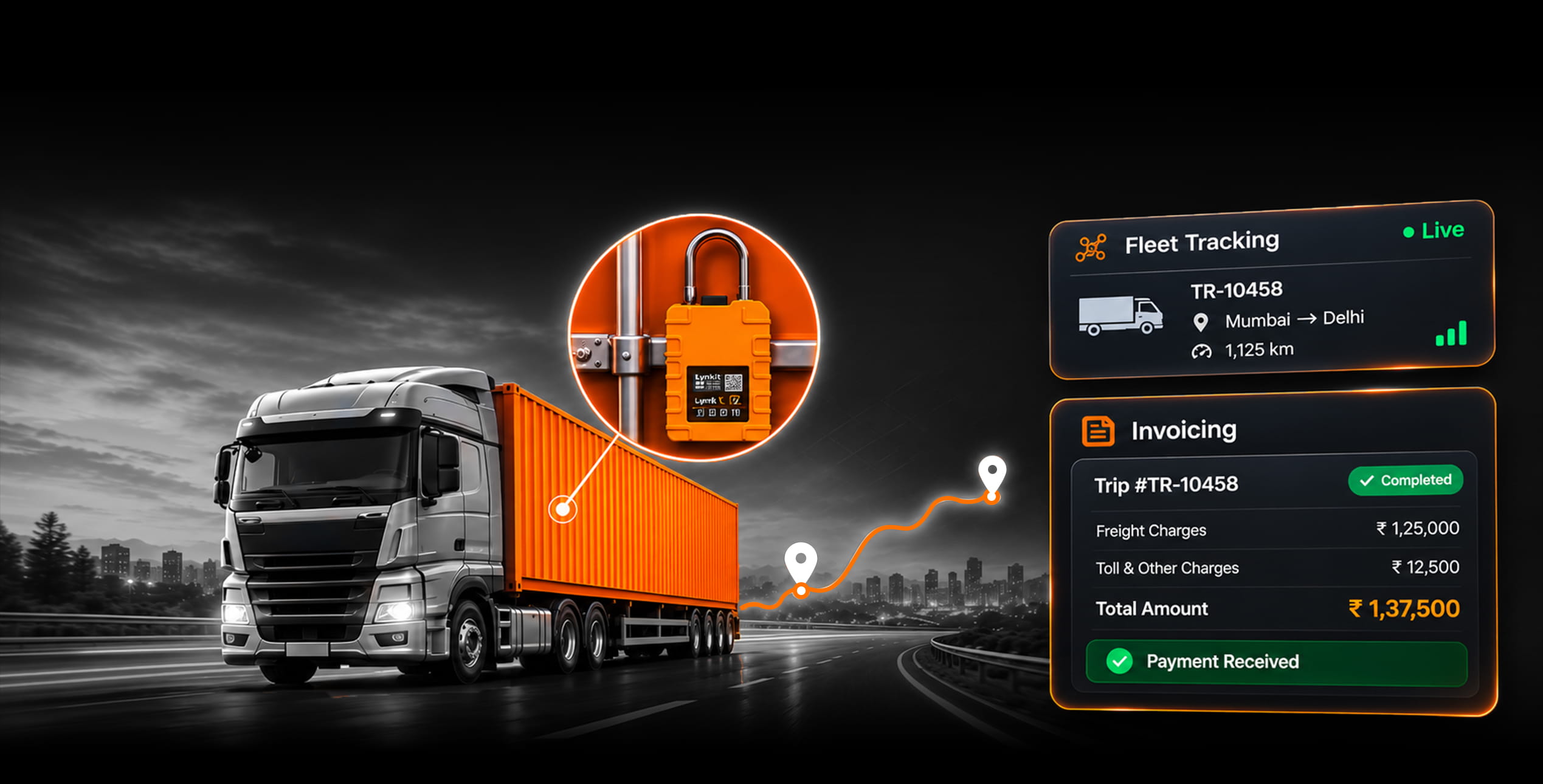
As the truck leaves, a GPS lock is sealed and linked to the trip. Location from GPS, SIM, FASTag and the driver's app shows on one map. If the truck stops too long or leaves its route, you get an alert with the location and the lock status.
Step 6: The load is delivered
At the distributor, the driver takes photos that record the location. The receiver confirms with an OTP and reports any shortage or damage right there. The digital proof of delivery (e-POD) reaches your billing team as soon as unloading ends.
Step 7: The bill is made
The freight bill builds itself by matching three things: the contract rate, the trip record and the e-POD. Waiting charges (detention) are counted by the hour against the free time you agreed. Penalties come straight from the contract. And with GPS-based billing, the distance on the bill is the distance GPS recorded, not the kilometres someone typed in.
Step 8: The transporter is paid
Finance approves and pays in full, in parts or on a schedule. TDS and GST are added automatically, and every payment links back to its trip.
Notice what didn't happen? Nobody typed the load details twice. What was entered with the order went all the way to the payment.
What Does a GPS Lock Add That GPS Tracking Can't?
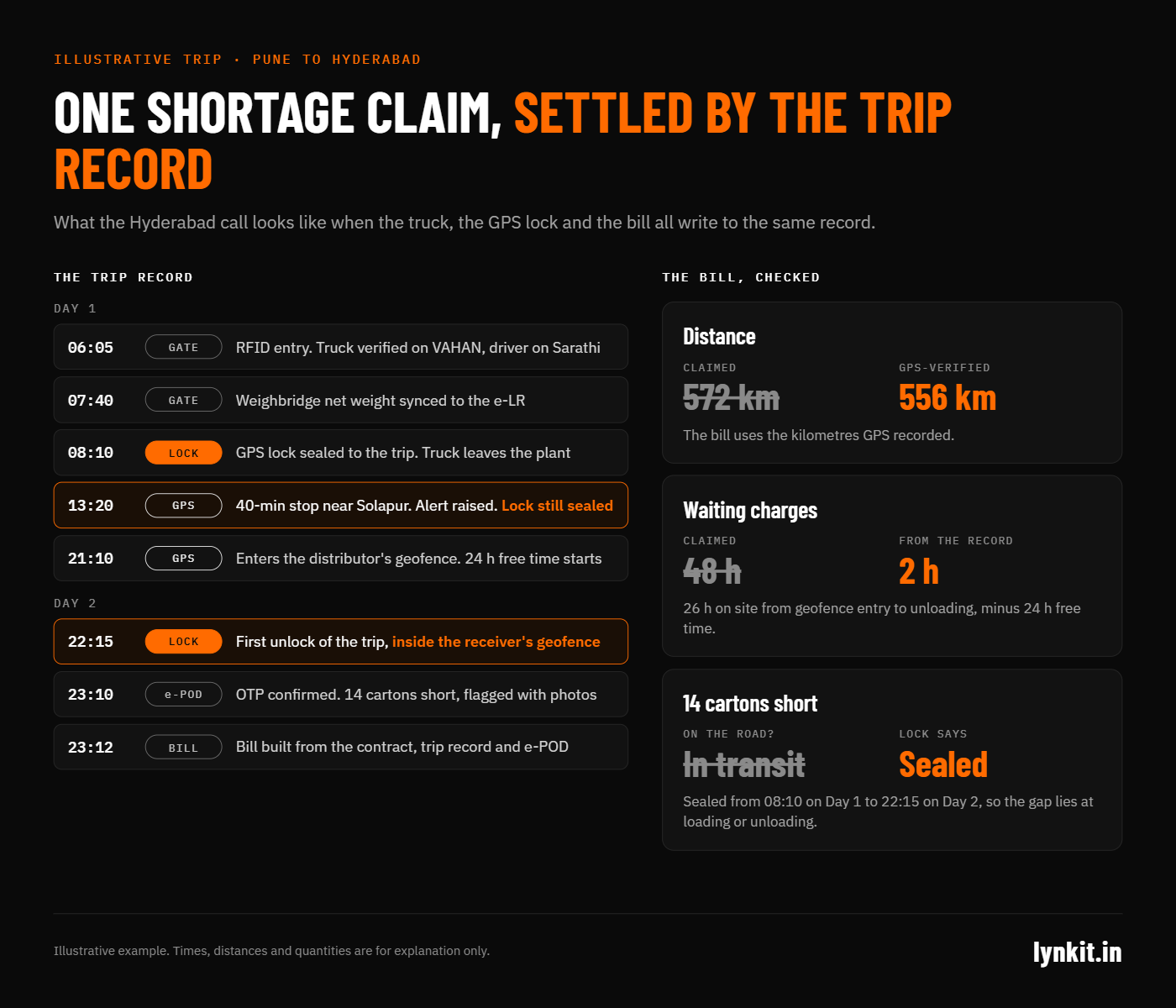
GPS can tell you the truck stopped for 40 minutes near Solapur. It can't tell you whether someone opened the doors during that stop. And that's the question behind most shortage claims.
This is where a GPS lock helps. It tells you what happened to the cargo, not just the truck.
How a GPS lock fits into the trip
- When the truck leaves: the lock is sealed and linked to the trip, the truck and the driver.
- On the road: the lock sends an alert if someone tampers with it, opens its cover or cuts its connection, or if it goes offline. It records every time it's opened or closed, and whether that happened at an approved spot (inside a geofence) or somewhere else. For serious alerts like tampering, an AI voice call can go straight to your control room.
- At delivery: the lock should open only at the receiver's location. If it opens anywhere else, the trip gets flagged.
- At billing: the lock's history sits next to the proof of delivery, so shortage claims are settled on facts, not memory. On the freight bill itself, GPS-verified distance replaces the kilometres the transporter claims, so you pay only for the distance the truck actually drove.
Back to the Hyderabad call
The trip record shows the stop near Solapur. But it also shows the lock stayed closed until the truck reached the distributor. The weight at the plant matches the lorry receipt. So the cartons went missing at loading or unloading, not on the road.
You can now talk to the transporter with proof in hand. And if the lock had opened at that stop, your control room would have known while the truck was still standing there.
AI cameras and Lynkit hardware
For high-value loads, AI cameras add one more layer. Cargo cameras can spot a person inside the cargo area. Driver cameras flag phone use, distraction, smoking and the risk of a collision.
This is where Lynkit's own hardware makes the difference. GPS locks, fuel sensors, OBD trackers, RFID gates and AI cameras are built by the same team that builds the TMS. So every alert lands on the trip it belongs to, on one dashboard. There's no second vendor, no separate app and no gap between the lock and the bill.
What Results Can You Expect From a TMS?
Lynkit customers report up to 30% lower freight costs and 65% faster transporter onboarding. One operations team put it simply: “Using Lynkit's TMS we have been able to save 4 hours per man per day, reducing manual paperwork.”
Percentages sound good, but they're hard to plan a budget with. So here's what they look like for a mid-sized team.
- Time saved: say you have 12 people in transport and accounts. If each saves 4 hours a day, that's 48 hours a day. Over 26 working days, it adds up to 1,248 hours a month. That's the work of six full-time people, now free to handle real problems instead of paperwork.
- Money saved: say you spend ₹2 crore a month on freight. Plan at a conservative 10%, which is a third of the top reported figure. That's ₹20 lakh saved a month, or ₹2.4 crore a year.
- Fewer billing fights: when waiting time is recorded by the hour and penalties come from the contract, you only pay for delays that actually happened. Both sides look at the same record, so there's less to argue about.
Lynkit's route planning is already at work on one of India's toughest delivery jobs. BPCL uses it to plan LPG deliveries around traffic, weather and distance, saving time and fuel and making deliveries more reliable.
Use these numbers as a guide. Before you start, note down your current freight spend, team hours and number of disputes, so you can measure the real change.
What Should You Check Before Choosing a TMS?
Most TMS demos look the same. These questions help you tell a system that actually runs your trips apart from one that only records them.
- Does it start at the plant gate? A lot of time is lost before the truck even leaves. Look for time slots, RFID gates and a weighbridge link, not just a dispatch screen.
- Can it track trucks you don't own? Most Indian routes run on hired trucks. Check that it can track through SIM, FASTag and a driver app, and show other GPS providers on the same map.
- Does it check documents, or just store them? Trucks, drivers and transporters should be verified on VAHAN, Sarathi, PAN and GSTIN when they join, with alerts before documents expire.
- Can it see the cargo, not just the truck? Lock alerts should show up on the trip and the delivery proof, not in a separate app.
- Does tracking data reach the bill? Waiting charges, penalties and bill checks should come from the trip record, not a spreadsheet.
- Can it make payments? Paying transporters, adding TDS and GST, part payments and Bharat Connect bill payments should all happen in one place.
- Who built the route planner? A planner built in-house can be tuned to your routes. One that depends on outside map services costs more and gives you less control.
- Can you start small? You should be able to upload Excel files on day one, start with orders, tracking and delivery proof on a few routes, and add more as you grow.
It's the Trip You're Really Managing
Seeing a truck on a map is helpful. But seeing that truck linked to its order, its lock, its delivery proof and its bill is what protects your profit.
Fleet tracking tells you where the truck went. A GPS lock tells you what happened to the cargo. A TMS connects both to what you should pay. And it does this while the truck is still on the road, not three weeks later when the bill shows up.
That's the difference between knowing something went wrong and being able to prove it, fix it and settle it.
See Lynkit work on your own routes. Book a 30-minute demo. We'll set it up around your plants, transporters and freight, and share a savings estimate and a plan for your first routes. Call +91 11 4082 4028 or write to sales@lynkit.in.
Frequently Asked Questions About TMS
What is a transport management system (TMS)?
A TMS is software that runs a shipment from start to finish: truck requests, route and load planning, choosing transporters, tracking, proof of delivery, billing and payment. Lynkit TMS does all of this on one platform for shippers, transporters, 3PLs and terminals.
How does a TMS work with GPS tracking?
GPS tracking shows where the truck is, where it stopped and how it's being driven. The TMS links that to a specific trip. So a wrong turn becomes an alert, the delivery location confirms the proof of delivery, and the trip record helps build the bill.
Why use Lynkit hardware with Lynkit TMS?
Because the hardware and the software come from one team. Lynkit's GPS locks, fuel sensors, OBD trackers and RFID gates report straight into the trip record. A tamper alert, a fuel drop or a gate entry is tied to the right load and bill, with no integration work. For hired trucks, SIM, FASTag and driver-app tracking fill the gaps.
Can a TMS track hire trucks?
Yes. SIM and driver-app tracking work for trucks you don't own, and other GPS providers can show on the same map.
How do GPS locks help with shortage and theft claims?
Every time the lock is opened, closed or tampered with, it's recorded with the location. If it opened only at the receiver's location, the cargo wasn't touched on the road, and the claim can be settled on that record.
Can a TMS stop overbilling?
It can catch it. Bills are built from the contract rate, the trip record and the proof of delivery. Distance is billed on GPS-verified kilometres, not claimed ones. Waiting time is counted by the hour against the agreed free time, and penalties are applied from the contract.
Does Lynkit TMS connect with SAP or other ERPs?
Yes. Lynkit's APIs connect to SAP and other ERPs for orders, trips, dispatch and billing. You can also start with Excel uploads on day one.
Which industries use Lynkit TMS?
Manufacturing and FMCG, oil, gas and energy, warehousing and 3PL, ports and EXIM, e-commerce and D2C, and public sector depots.